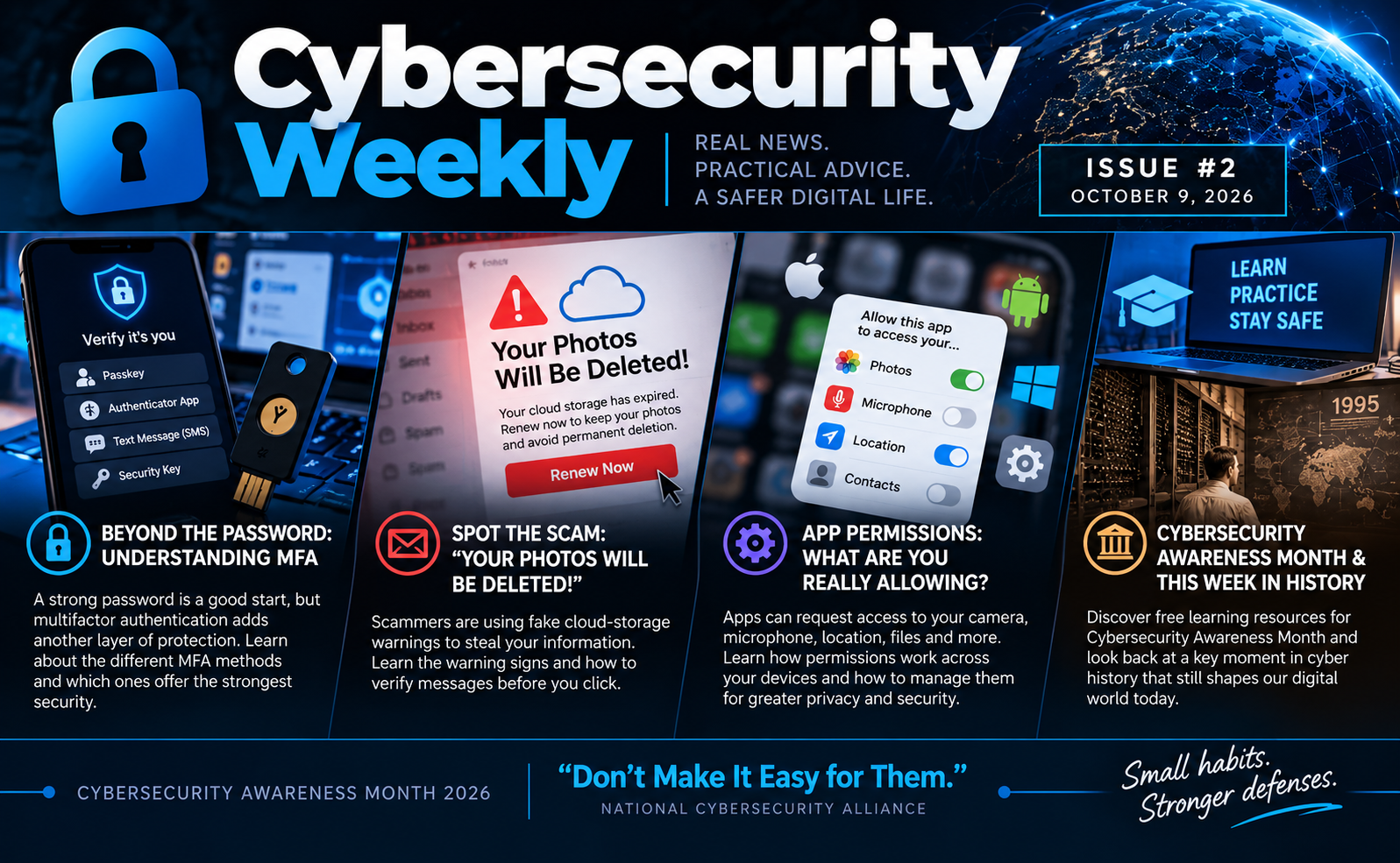
🔐 Cybersecurity Weekly | Issue #2 | October 9, 2026
Mike M. — Technical Support Specialist
Beyond the Password: Recognizing Scams and Strengthening Your Digital Defenses
Last week, we explored how AI is changing scams, why smartphones deserve protection, and how much access we give connected applications.
This week, we're taking the next step: making our accounts harder to steal, recognizing suspicious messages before we act, and understanding why application permissions matter.
Cybersecurity awareness isn't about memorizing every new threat. It's about building habits that help protect us from both old tricks and new ones.
🔑 Beyond the Password: Understanding MFA
A strong, unique password is an important first defense, but passwords can still be stolen. Multifactor authentication (MFA) adds another way to verify that the person signing in is really you.
Not all MFA methods work the same way. Text-message codes provide additional protection, but can be vulnerable to phishing and SIM-swapping attacks. Authenticator apps offer alternatives to SMS, although one-time codes can still be stolen through convincing phishing websites. Properly implemented passkeys and physical security keys can resist many common phishing techniques.
Even with MFA enabled, be cautious of unexpected verification requests. Criminals may try to trick you into sharing codes or approving sign-ins you didn't initiate.
What you can do: Check the security settings for your primary email account. Enable MFA if it's not already active, and choose the strongest available method you can comfortably use.
Read CISA: More Than a Password
🗑️ Spot the Scam: “Your Photos Will Be Deleted!”
Imagine opening your email to find an urgent warning: your cloud storage has expired, and your photos will be permanently deleted unless you renew immediately.
Messages like these are a recurring phishing tactic. Different senders may use similar warnings, countdowns, discounts, and payment requests to pressure people into clicking suspicious links.
The Federal Trade Commission has warned about messages impersonating familiar cloud-storage providers. These scams may attempt to steal personal information, capture account credentials, or install malicious software.
Can you spot the warning signs? The message creates fear of losing something valuable, demands immediate action, and directs you to a link you weren't expecting.
What you can do: Don't follow the email's link. Open your cloud-storage app or visit the provider's official website independently and check your account status. If the message is fraudulent, report it as phishing.
Read the FTC: Are You Really Out of Cloud Storage, or Is That Message a Scam?
🔍 App Permissions: What Are You Really Allowing?
When installing an app, it's easy to tap Allow without giving it much thought. But that simple decision can grant access to your camera, microphone, location, contacts, photos, or files.
These permissions help legitimate applications work, but unnecessary access can also create privacy and security risks. A recent SANS NewsBites article highlighted Apple's Full Disk Access controls on macOS, a reminder that some permissions can expose considerably more information than users realize.
The same principle applies to Android phones, iPhones, Windows computers, and browser extensions, although each platform manages permissions differently.
Before granting access, consider whether the application actually needs it. A navigation app may reasonably request your location, but does it need that information when you're not using it? Does a simple utility really need your contacts?
What you can do: Open your device's privacy or application settings and review permissions for apps you rarely use. Remove unnecessary access, and consider options such as allowing location access only while using an app.
Learn more:
Apple: Controlling App Access to Files in macOS
Apple: Control Access to Information in Apps on iPhone
Google: Change App Permissions on Your Android Phone
Microsoft: App Permissions in Windows
🛡️ Cybersecurity Awareness Month: Keep Learning
Cybersecurity Awareness Month isn't just about warnings. It's also an opportunity to learn something new.
Cisco Networking Academy is promoting a 30-Day Cybersecurity Challenge featuring short daily learning activities, while CISA offers free cybersecurity awareness resources, including guides and materials that can be shared with family members, friends, and coworkers.
You don't have to become a cybersecurity professional to benefit. Learning to recognize a suspicious message, secure an account, or review an application's permissions can make a meaningful difference.
What you can do: Choose one topic you're curious about and spend a few minutes exploring it. Better security begins with understanding what you're protecting.
Explore Cisco Networking Academy
Explore CISA: Secure Our World
🕰️ This Week in Cyber/Tech History: A Day in the Life of Cyberspace
On October 10, 1995, MIT's Media Laboratory published A Day in the Life of Cyberspace , a project documenting how the emerging World Wide Web was beginning to change people's lives.
The project explored subjects including privacy, communication, culture, and the ways technology was connecting communities.
Thirty-one years later, those questions remain remarkably relevant. The internet has evolved from an emerging technology into an essential part of everyday life, carrying our conversations, finances, personal information, and identities.
The tools have changed dramatically, but questions about privacy, trust, and how we interact online have been with us since the web's early days.
Computer History Museum: A Day in the Life of Cyberspace Published
💡 One Thing to Do This Week
Protect your primary email account.
Your email is often the gateway to resetting passwords and recovering other accounts. Take five minutes to review its security settings.
Confirm that you have a strong, unique password or passkey, enable MFA, and check that your recovery information is current.
If you're already protected, help a friend or family member do the same.
Small habits build stronger defenses.
Stay aware. Stay curious. Don't make it easy for them.
#Cybersecurity #CybersecurityAwarenessMonth #OnlineSafety #PhishingAwareness #MultiFactorAuthentication #Phishing #CredentialAccess #CloudSecurity
4 reactions · 1 comments
Topics: #cybersecurityawarenessmonth, #phishing, #multifactorauthentication, #cloudsecurity, #credentialaccess, #cybersecurity, #phishingawareness, #onlinesafety
Comments
Schomer: Great layout on the user-awareness essentials, Mike. Foundational training is critical for shrinking the human attack surface against credential theft and basic social engineering. The real architectural challenge we face next is protecting the enterprise once an attacker bypasses these initial user checkpoints via session hijacking or zero-click vectors. When MFA tokens are cloned or intercepted,